
Helium Customer Fields is a powerful Shopify app. It lets you collect and manage detailed customer info beyond the basics: name, email, and address. This Shopify custom form app offers pet brands a unique opportunity to gather specific pet data, such as breed, age, allergies, and dietary preferences. By leveraging this information, you can significantly improve your customer experience, marketing strategies, and overall business performance. Helium’s customer field easily integrates with Shopify and Shopify Plus and works with all of Shopify’s plans.
In this blog, we will discuss the five benefits of using Helium Shopify customer fields for pet brands on Shopify and the step-by-step process of How to Install and add the Helium customer field app on Shopify.
How Does Helium Customer Fields Work?

Helium Customer Fields is a comprehensive toolkit designed for Shopify store owners who want to collect and manage customer information effectively. The Shopify form builder app lets you create unique registration forms. It can collect first-party data, like birthdays and pet names. This gathered data smoothly integrates with Shopify or meta fields, ensuring your customer records are always up-to-date.
The capability to personalize forms with conditional rules and auto-tag customers based on their inputs makes it suitable for businesses of all sizes that aim for targeted marketing and better customer relationship management. For example, a startup can leverage automatic tagging to segment its customers efficiently without needing extensive resources. Bigger enterprises can utilize the REST API access provided in advanced plans to integrate deep within their complex systems.
What Are the Key Features of the Helium Customer Field App?
The Helium custom fields Shopify app boasts many essential features that significantly enhance your shopping experience. Below, we highlight some key benefits that make this app invaluable.
Valuable Key Features
- The Helium customer fields app creates unique registration forms for different customer groups.
- Collect first-party customer data such as birthday, pet’s name, VAT/Tax ID, etc.
- Sync customer data with Shopify fields and customer meta fields
- Personalize forms with rules and variables
- Tag customers automatically based on form input
- Integrate customer data with business/marketing tools
How Do You Install and Add the Helium Customer Field App on Shopify?
Helium Customer Fields is a Shopify app that integrates with Shopify Flow to automate processes. Here’s how to install and add the Helium customer fields app to your Shopify store:
1. First, Install the Helium Customer Field App:
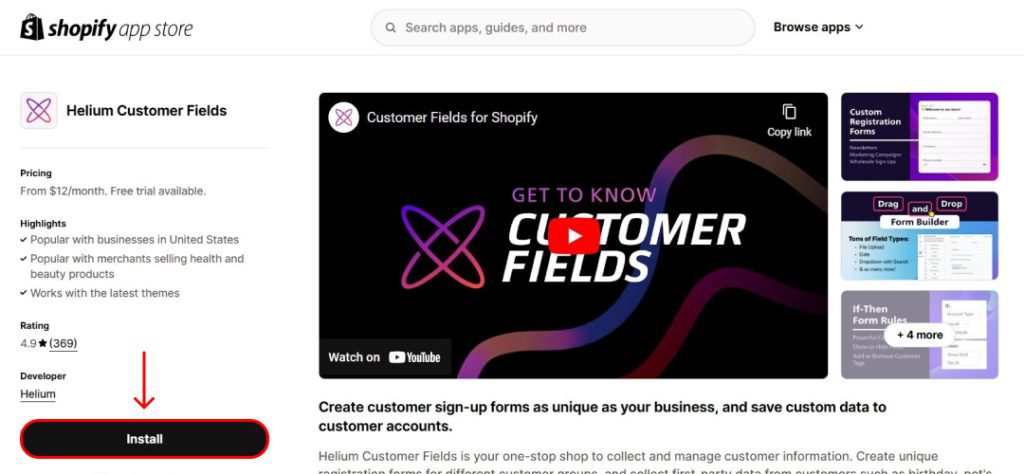
- Log in to your Shopify admin dashboard.
- Go to the Shopify App Store.
Search for “Helium Customer Fields” and install the app(If you already have installed you can check it out at the bottom of the left )
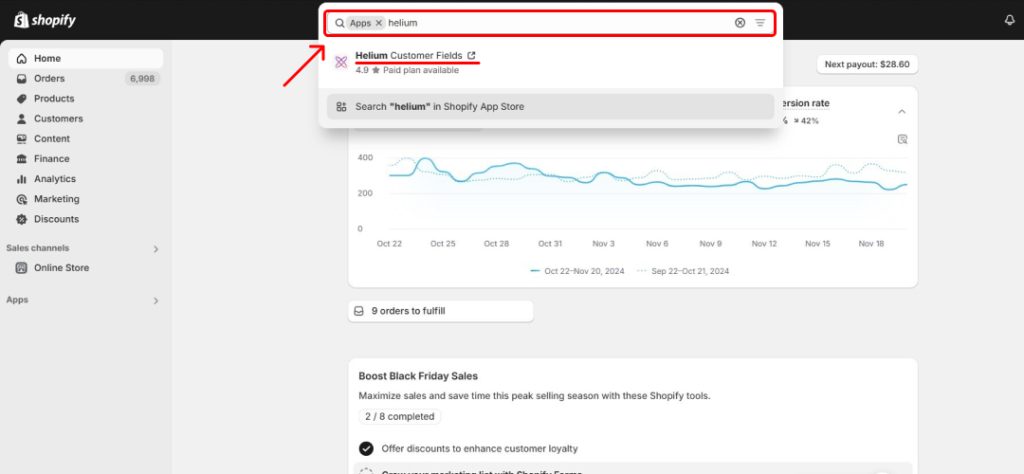
2. Create a Customer Field Form:
- Once installed, navigate to the Helium Customer Fields app in your Shopify admin.

- Click on “Forms” and then “Add Form”.
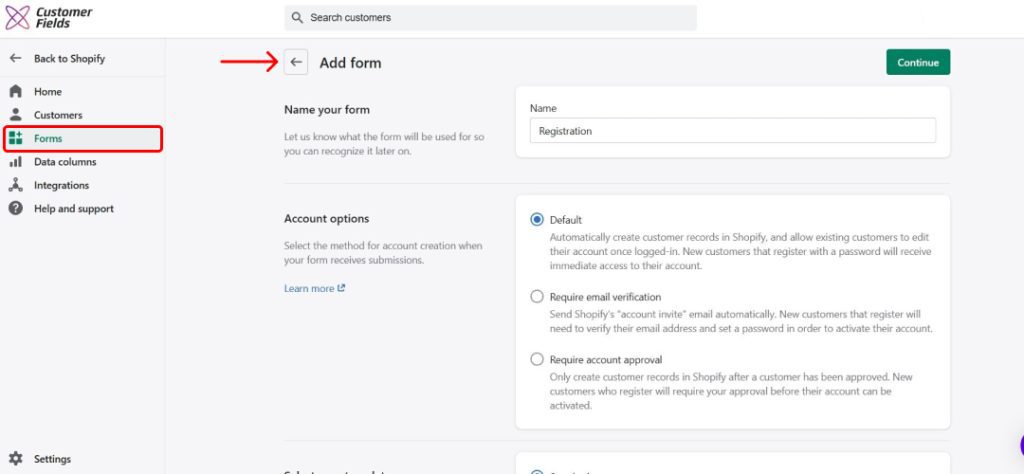
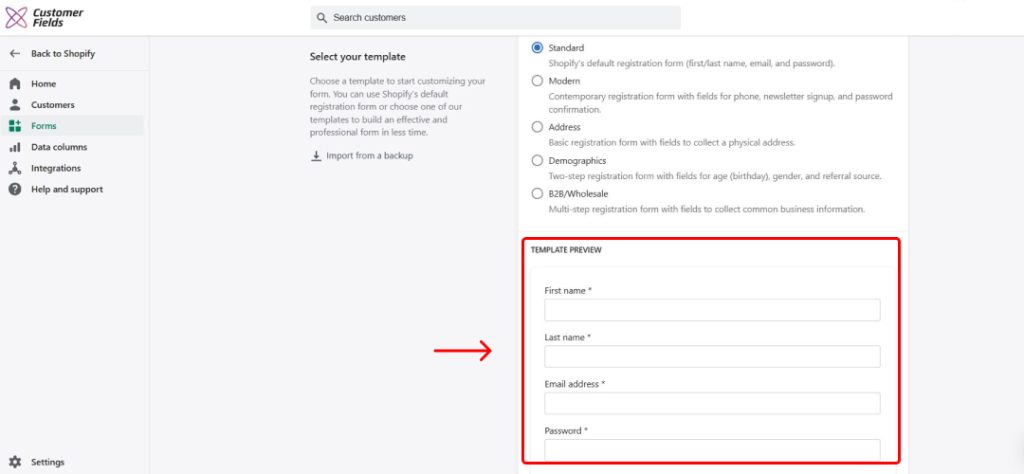
- Choose a template or start from scratch.
- Design your form by adding the desired fields (e.g., name, email, phone number, custom fields).
3. Install the Form on Your Storefront:
There are three main methods to install the form:
Method 1: App Embed
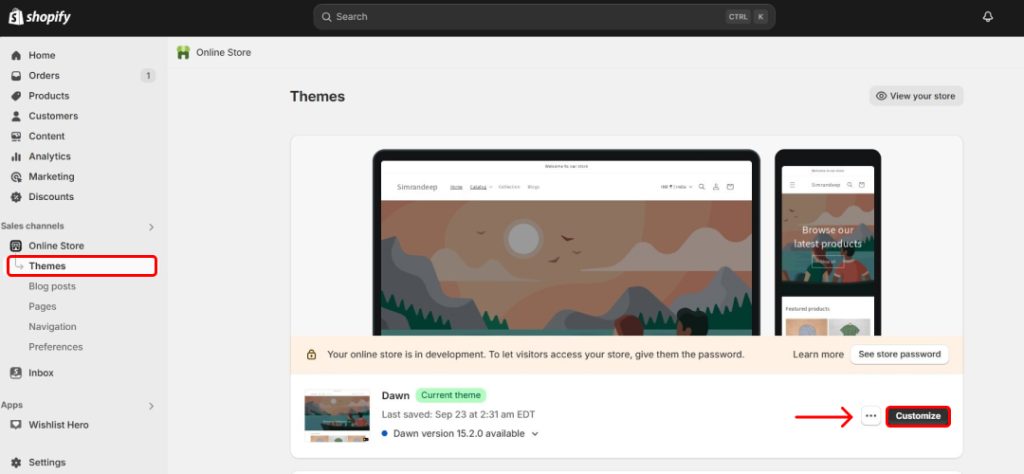
- Go to Sales channels > Online Store > Themes > Customize.
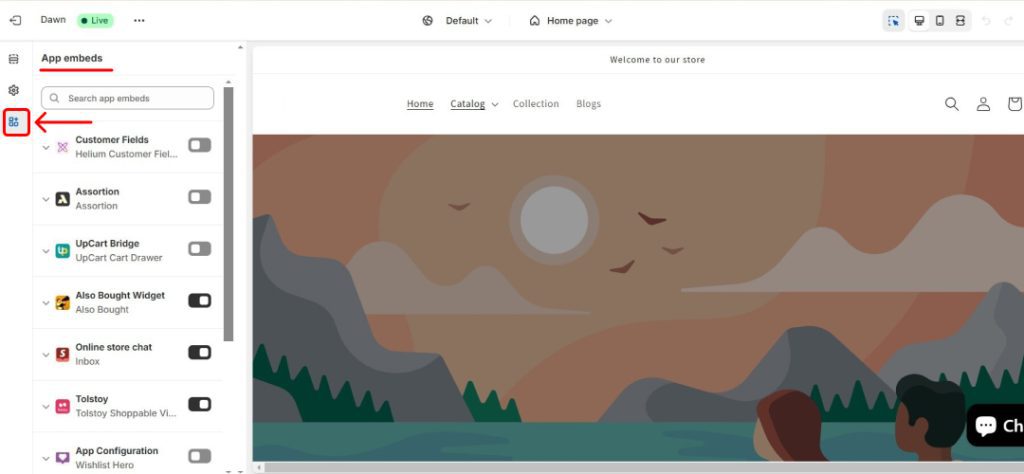
- Click on the “App embeds” icon in the left sidebar.
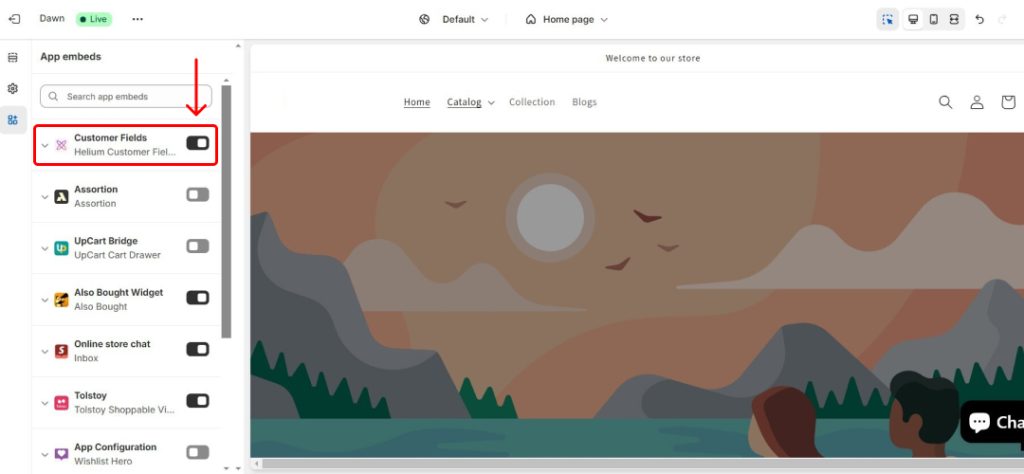
- Enable the “Customer Fields“ app embed.
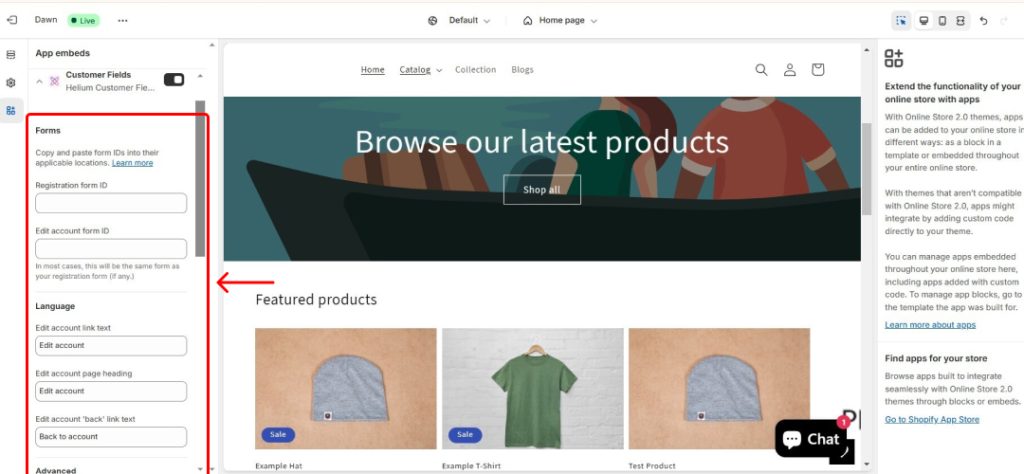
- Fill in the Form ID (usually “Registration form ID” or “Edit account form ID”) and lastly save and preview.
Method 2: App Blocks
- In the Helium Customer Fields app, go to your form’s “Installation” tab.
- Copy the “App block code”.
- Add a new section or edit an existing one in your Shopify theme editor.
- Paste the app block code into the section’s HTML.
Method 3: Shortcode
- In the Helium Customer Fields app, go to the “Installation” tab of your form.
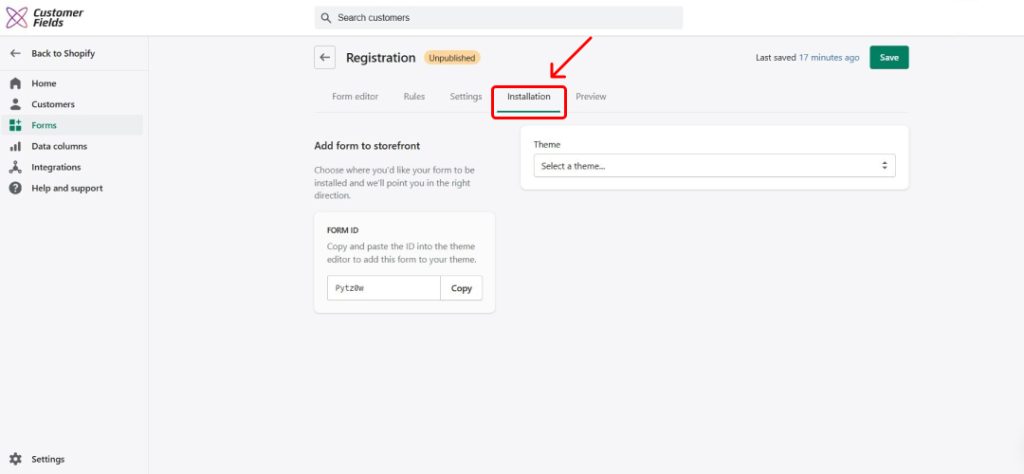
- Copy the “Shortcode”.
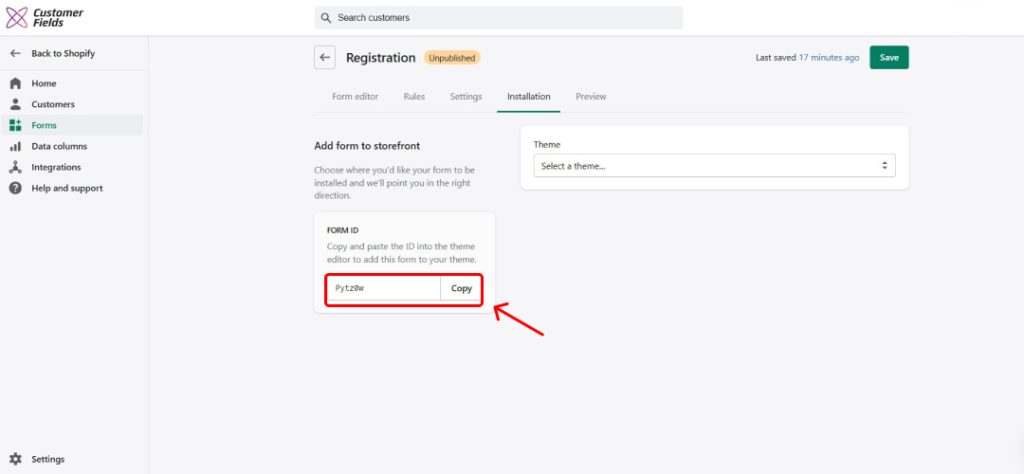
- In your Shopify theme editor, add the shortcode to the desired location within the HTML.
Additional Tips:
- Customize Your Form: Use the Shopify form builder app to add conditional logic, customize the appearance, and more.
- Test Your Form: Thoroughly test the Shopify custom form on different devices and browsers to ensure it functions correctly.
- Review the Helium Help Center: Refer to the Helium Help Center for detailed instructions and troubleshooting tips.
By following these steps, you can effectively install and add Helium Customer Fields Shopify app to your Shopify store, enabling you to collect valuable customer information and enhance your customer experience.
5 Benefits of Using Helium Customer Fields for Pet Brands on Shopify
Helium Customer Fields is a valuable app that can boost your pet brand’s online store visibility. Here’s how it helps:
1. Enhanced Customer Profiles: A Deeper Understanding of Your Customers
Helium Customer Fields allows you to create a complete customer profile that goes beyond basic contact information. You can gather detailed insights into your customers’ pets, such as:
- Breed: Identify specific breed needs and preferences.
- Age: Tailor product recommendations based on life stage.
- Weight: Ensure accurate dosage for medications and supplements.
- Allergies: Avoid products that may trigger adverse reactions.
- Dietary Restrictions: Cater to specific nutritional needs, such as grain-free or hypoallergenic diets.
By understanding these nuances, you can provide highly personalized recommendations, such as suggesting appropriate toys for a high-energy puppy or recommending a gentle shampoo for a sensitive-skinned cat.
2. Streamlined Checkout Process: A Seamless Shopping Experience

A smooth and efficient checkout process is crucial for converting potential customers into loyal patrons. Helium Customer Fields can significantly streamline this process by:
- Auto-filling Information: Automatically populates customer and pet details, reducing form-filling time.
- Faster Checkout: Expedite the purchase process, leading to higher conversion rates.
- Improved Customer Experience: Create a seamless and hassle-free shopping journey.
By saving time and effort, you can encourage more customers to complete their purchases and return for future shopping trips.
3. Improved Customer Segmentation: Targeted Marketing for Maximum Impact
With detailed customer data, you can create highly targeted customer segments based on specific pet characteristics. This enables you to deliver personalized marketing messages and promotions that resonate with your customer’s needs and preferences. Some effective segmentation strategies include:
- Breed-Based Segmentation: Target customers with specific breeds, such as Golden Retrievers or Persian Cats.
- Age-Based Segmentation: Tailor marketing efforts to different life stages, like puppies, kittens, adults, and seniors.
- Dietary Needs Segmentation: Reach out to customers with specific dietary requirements, such as grain-free or hypoallergenic diets.
By understanding your customers’ unique preferences, you can deliver more relevant and effective marketing campaigns that drive sales and increase customer engagement.
4. Better Inventory Management: Optimal Stock Levels for Maximum Profitability

You can gain valuable insights into product demand and seasonal trends by analyzing customer data and purchase history. This information can help you optimize your inventory levels, ensuring you have the right products in stock at the right time.
- Predictive Inventory: Forecast demand based on customer preferences and purchase history.
- Optimized Stock Levels: Avoid stockouts and overstocking, reducing costs.
- Improved Customer Satisfaction: Ensure products are available when customers need them.
You can reduce costs, minimize waste, and improve customer satisfaction by effectively managing your inventory.
5. Enhanced Customer Loyalty: Building Lasting Relationships
Building strong customer relationships is essential for long-term success. Helium Shopify custom form can help you foster loyalty by:
- Personalized Experiences: Provide tailored recommendations and services.
- Exceptional Customer Service: Address specific pet needs and concerns effectively.
- Stronger Brand Relationships: Build trust and loyalty through a customer-centric approach.
By going the extra mile to understand and cater to your customer’s needs, you can create a loyal customer base that will continue to support your business for years to come.
Conclusion
Helium Customer Fields has a great design and many features. Its pricing plans fit any business size. These things make it stand out. Helium Shopify’s custom form app is your one-stop shop for collecting and managing customer information.
We hope you find everything related to Helium customer fields in the above content. This simple, step-by-step guide will be beneficial when installing and adding a Helium customer field to your Shopify store. For more information or help with Helium customer fields, contact us for a free consultation.